
Designing Trust into AI-Connected Commerce
ThriveCart MCP, Research, Onboarding, Permissions, and AI Product Design
In short
- Problem
- Users were asking an AI connection to reach business and financial data, and could not tell what it could access or whether setup had worked.
- My role
- Product designer and UX researcher. I planned and ran the sessions, synthesised the findings, and designed and iterated the onboarding guide.
- Key decision
- Treat trust as a product feature rather than a legal detail: make permissions visible, the connection legible, and failure recoverable.
- Outcome
- The onboarding guide went from a PDF to a web guide that tested better. Setup friction largely disappeared, and a plain can-and-cannot-access list built trust. Iteration was ongoing when I left.
- Role
- Product/UI/UX Designer and UX Researcher
- Scope
- Two rounds of user research, the onboarding guide (PDF, then web), trust and permissions messaging, and product recommendations.
- Collaboration
- Product, design, engineering, and research stakeholders.
- Status
- Internal beta, not publicly released. The onboarding guide was tested with users, and iteration was ongoing when I left.
- AI focus
- Designing an AI connection experience for querying ThriveCart data through Claude and ChatGPT.
- Core challenge
- Make the integration useful, understandable, trustworthy, and easy to set up.
Background
ThriveCart is a checkout and selling platform for solopreneurs, coursemakers and community builders. Sellers use it to run their checkout pages, products, subscriptions, affiliates and customer records, so the account holds the day-to-day financial life of their business.
ThriveCart MCP was being built to let those sellers connect their account to Claude or ChatGPT and ask questions about their own business data in plain language, without logging into the ThriveCart dashboard. It was in internal beta and had not been publicly released.
ThriveCart's scale is what made trust the central design problem. Once released, a connection that lets an AI assistant read sales, customers and affiliate payouts would reach the livelihoods of a very large number of small businesses, and the personal data of their customers.
75,000+
Solopreneurs, coursemakers and community builders using ThriveCart, as published by ThriveCart.
$8B+
Processed through ThriveCart checkouts, as published by ThriveCart.
100+
Countries where ThriveCart checkouts can take payment.
The Challenge
The core challenge was not simply: “How do we connect ThriveCart to Claude?”
It was: “How do we make an AI connection feel useful, understandable, and safe when users are asking it to access business and financial data?”
The research surfaced several adoption risks:
- Users were confused by the setup path.
- The onboarding instructions reflected an outdated interface.
- Users expected a custom connector flow that no longer matched the product.
- Users were unsure whether the connection had completed successfully.
- Authentication timeouts created uncertainty.
- Users wanted to understand exactly what the AI could and could not access.
- Non-technical users needed more visual guidance.
- Users were concerned about exposing financial and customer data.
- Some users wanted to verify AI-generated results before trusting them.
The design question
How might we make an AI connection feel useful, understandable, and safe?
What I Owned
The main thing I designed was the onboarding guide that walks sellers through connecting their account. I wrote the first version as a PDF, tested it, rebuilt it as a web guide, and tested it again.
Around the guide, I directly contributed to:
- Planning and running two rounds of user research sessions.
- Synthesising feedback from technical and non-technical participants.
- Identifying onboarding and discoverability issues.
- Separating technical and non-technical user needs.
- Identifying trust, permission, and privacy concerns.
- Designing and iterating the onboarding guide, from PDF to web.
- Recommending a visual connection-flow overview.
- Defining clearer success and confirmation states.
- Identifying error and recovery states.
- Translating research findings into product priorities.
Cross-functional collaboration
I worked with the wider product and design team to share findings and shape next steps for the integration.
Research Approach
I ran 10 moderated sessions across two rounds, using screen-share and think-aloud. Participants were ThriveCart team members from support, QA and engineering, connecting through both Claude and ChatGPT. The first round tested the PDF guide with 7 people; the second tested the rebuilt web guide with 3.
Each session explored four things: where setup broke down, whether people could discover what the integration could do, which use cases mattered to them, and how far they trusted the answers.
From sessions to direction
- 01Research sessions
- 02Observed behaviour
- 03Themes and friction points
- 04Product opportunities
- 05Design recommendations
- 06Prototype and next steps
Technical users
- Faster activation.
- Minimal friction.
- Example prompts.
- Troubleshooting references.
- Quick access to advanced capabilities.
Non-technical users
- Step-by-step guidance.
- Visual explanations.
- Clear confirmation states.
- Beginner-friendly language.
- Privacy and permission explanations.
- Embedded troubleshooting support.
Key finding 01
Why trust mattered
Research insightFor a ThriveCart seller, the account is not just software. It holds their revenue, their refunds, their affiliates' payouts and the names and purchase history of their customers. Connecting an AI assistant to it means handing a new and unfamiliar kind of tool a view of their livelihood.
Sellers also carry responsibility for their customers' data. The privacy concern we heard was rarely about their own figures; it was about exposing customers' personal and financial details.
And an AI that answers confidently but incompletely is a risk in itself: a seller making a pricing or refund decision on a wrong number loses money.
In the sessions, users wanted to understand:
- What data the integration could access.
- Whether financial data was exposed.
- Whether connected Stripe information was accessible.
- What happened during authentication.
- Whether the connection had completed successfully.
- Whether the AI response could be trusted.
Everyone verified the AI's first answers against what they already knew before relying on it. Trust in ThriveCart itself was an asset: people preferred a connection built by ThriveCart over third-party automation tools. The clearest break in trust came from incomplete results, such as a product list that silently left out test-mode products.
This showed that trust could not be treated as a legal or technical detail alone. It needed to be designed directly into the user experience.
User research insight
“I trust ThriveCart, but I don’t trust AI with my financial data.”
Key finding 02
Onboarding
Research insightThe first round, testing the PDF guide, showed that the setup instructions did not match the current product interface.
Users were confused because:
- The location of the connector flow had changed.
- Instructions described an outdated setup process.
- Users expected an “Add Connector” flow with a URL and API key.
- The integration already existed in Claude’s connector list, but users had to search for it.
- The flow did not always provide a clear success state.
The problem was not only documentation quality. It was a mismatch between the product, the documentation, user expectations, authentication flow, and confirmation experience.
Key finding 03
AI Value Discovery
Research insightUsers needed help understanding what they could actually do after connecting the integration.
One onboarding opportunity was to prompt users with: “What can you do now that my MCP is connected?”
This would help users discover the value of the integration immediately after setup.
Performance analytics
Reporting assistance
Faster operational answers
Mobile access to business insights
Setup guidance
ThriveCart feature discovery
Design Direction
Design recommendationBased on the research, I recommended that the onboarding experience include:
- A visual connection overview.
- Clear permission and data-boundary explanations.
- Stronger success confirmation.
- Designed error and recovery states.
- Audience-specific onboarding.
- Beginner-friendly language.
- Troubleshooting and FAQ support.
- Example prompts after successful connection.
01 Visual connection overview
Show users what connects to what, before they start, so the setup path is legible rather than inferred.
02 Permission transparency
State what the AI can and cannot reach, in plain language, at the moment of connecting.
03 Success confirmation
Give the connection an unambiguous finish, so users are never left guessing whether setup worked.
04 Error recovery
Design the timeout and authentication failure paths, with a clear route back rather than a dead end.
05 Example prompt discovery
Offer first questions immediately after connection, so value arrives before the user has to invent it.
Designing trustworthy AI connections
Make the AI capability discoverable
Users should not have to guess what the integration can do.
Make permissions visible
Users should understand what data the AI can access before connecting it.
Make results verifiable
Users should be able to understand and confirm important AI-generated results.
Make failure recoverable
A timeout or authentication error should not leave the user unsure whether setup worked.
Design for different confidence levels
Technical and non-technical users need different levels of guidance and support.
Iterating the Onboarding Guide
Tested with usersThe onboarding guide was the first thing every seller would meet, so I treated it as part of the product rather than as documentation. I iterated it against what I saw in the sessions.
| Round | What happened |
|---|---|
| 1. PDF guide, 7 sessions | The instructions described an interface that had changed, and the guide's terms (a “connector” versus an “app”) did not match what people saw in Claude and ChatGPT. Setup friction dominated the sessions. |
| Rebuild | I analysed the sessions and rebuilt the guide as a website: step-by-step pages for Claude and ChatGPT, illustrations of what people would see, a first-question step so value arrived straight after setup, a page on what the AI can and cannot access, and a troubleshooting page. |
| 2. Web guide, 3 sessions | The web guide tested better. The setup friction from round 1 had largely gone, and people noticed and respected the read-only access. The remaining problems sat in the product rather than the guide: missing steps in Claude's custom connector flow, and gaps in the data the AI could return. |
Participants were ThriveCart team members, who skew more technical than most sellers, so real-world setup friction is likely higher. Round 2 was small, and it was not a controlled comparison.
How the integration handles data
The current beta is read-only and designed to limit access to the ThriveCart data required for supported use cases.
The integration does not provide access to payment-card credentials, passwords, or other authentication secrets, subject to the approved security model.
Review the connected AI provider's data-handling policy before using the integration with sensitive business data.
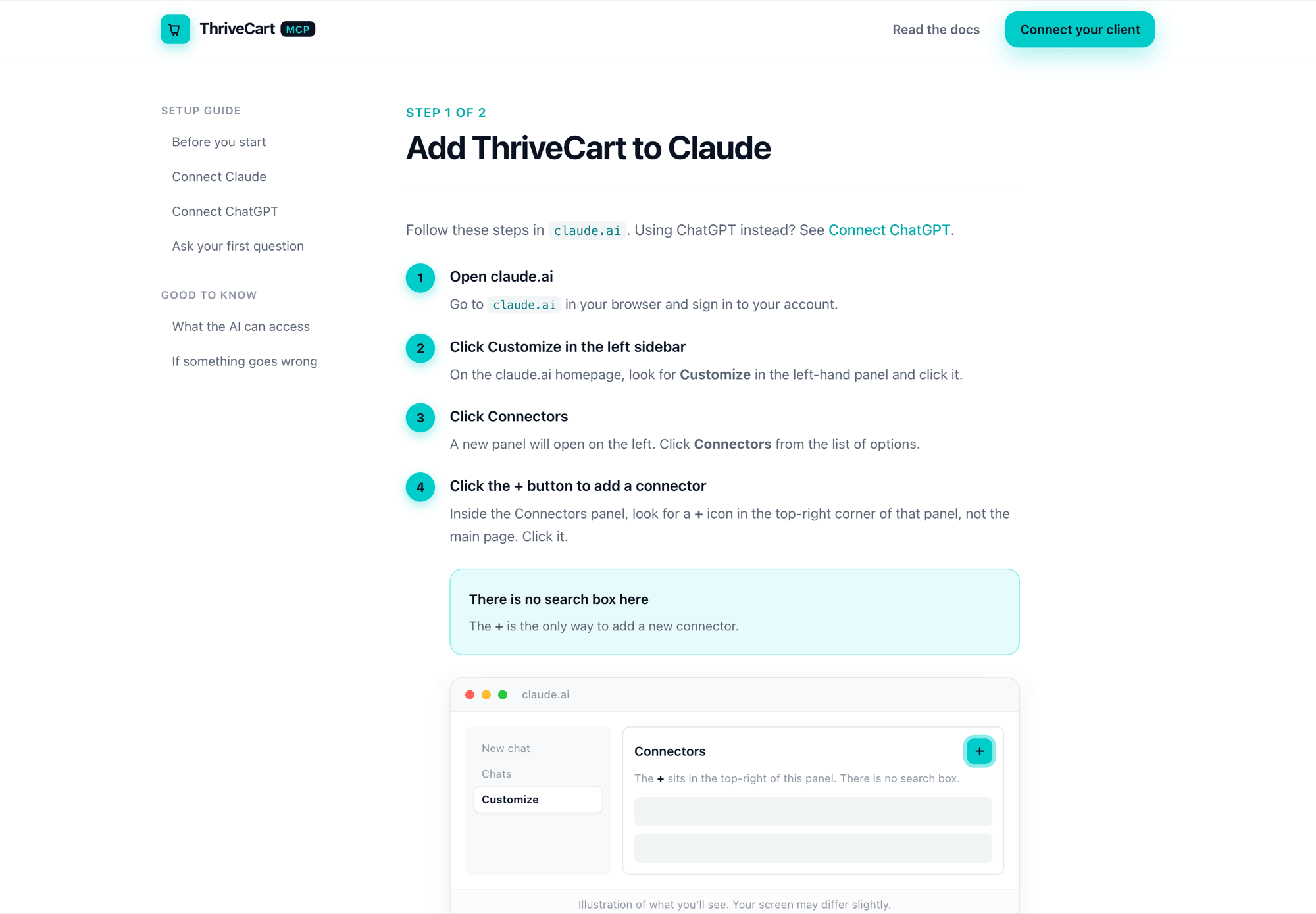
Onboarding guide, version 2 (web)
Tested with users- Problem
- The PDF guide described an outdated interface and used terms that did not match what people saw in Claude and ChatGPT.
- Decision
- Rebuild the guide as short, client-specific web pages with illustrations of each screen, so people can follow along step by step and always know where they are.
- Contribution
- Designed and wrote both versions; tested each with users and iterated between them.
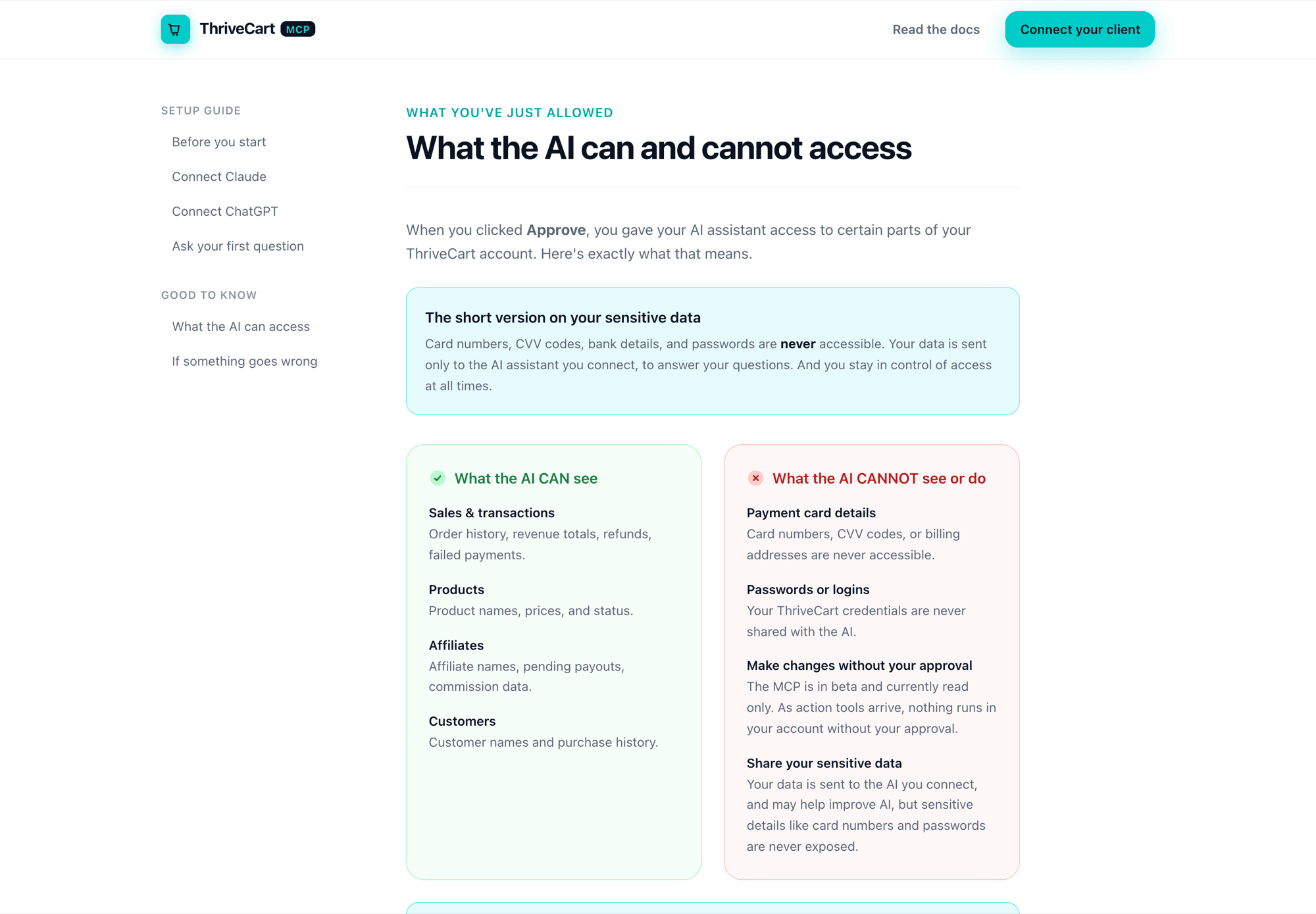
What the AI can and cannot access
Tested with users- Problem
- Sellers did not know whether financial, customer or Stripe data was reachable by the AI, and worried most about their customers' personal details.
- Decision
- Say exactly what the connection can see and what it can never see or do, side by side and in plain language, straight after people approve access.
- Contribution
- Designed the page and the plain-language access list from research findings.
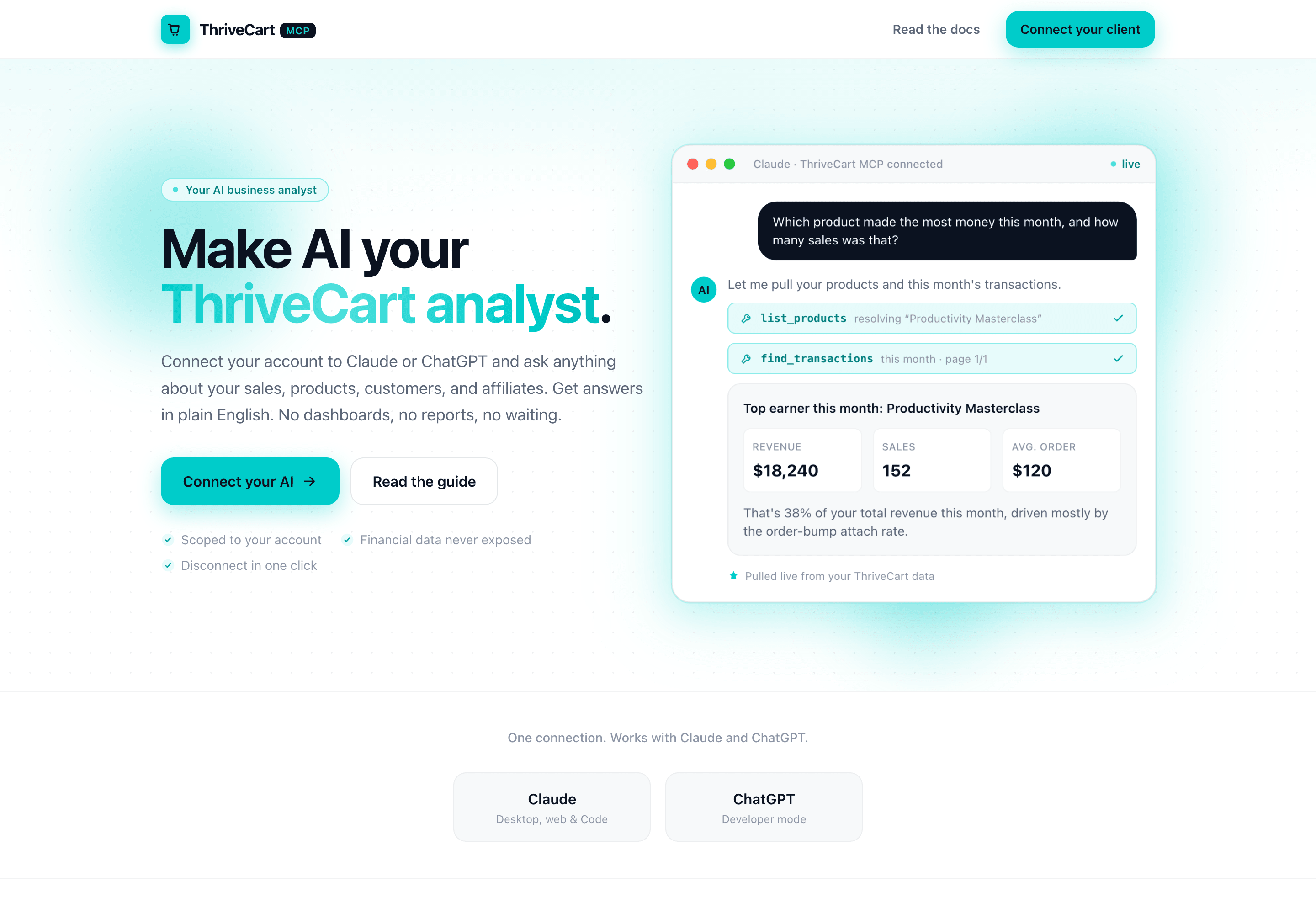
Landing page: your ThriveCart analyst
Tested with users- Problem
- Sellers needed to understand the value of the connection and its data boundaries before starting setup.
- Decision
- Position the integration as an analyst for the business, and put its data boundaries right beside its value rather than leaving people to infer either.
- Contribution
- Designed the landing page that leads into the guide.
Design recommendation
Connection-flow diagram
- Problem
- Users could not picture what connected to what before starting setup.
- Recommendation
- Show the connection as a diagram in onboarding rather than describing it in prose.
- Contribution
- Recommended; not yet designed in full.
Design recommendation
Success, timeout and recovery states
- Problem
- Authentication timeouts left users unsure whether the connection had worked.
- Recommendation
- Design the confirmation, timeout and recovery states explicitly rather than leaving them to the platform.
- Contribution
- Defined the states; not yet built.
Research insight
Research synthesis
- Problem
- Findings from technical and non-technical participants needed to become product priorities.
- Recommendation
- Group the friction points into themes and turn them into ranked recommendations.
- Contribution
- Owned the synthesis. The board itself is withheld because the source names participants.
Outcome: How Trust Was Gained
Trust did not come from reassurance copy. It came from making the connection legible at each point where people hesitated, then checking in the second round of testing whether it had worked.
Setup people could follow
The web guide removed the dominant friction from round 1. People could see where they were, and the guide's words matched the screens in front of them.
Boundaries people could see
The plain list of what the AI can and cannot access, and the read-only beta, were noticed and respected in round 2. People understood what they had approved.
Value straight after setup
A first-question step gave people an answer they could check against what they already knew. Checking early answers was how every participant built confidence.
A clear line between guide and product
Once the guide stopped being the problem, the remaining trust risks were visible as product work: incomplete results, missing data and interface gaps, logged for engineering.
Still in progress when I left
Iteration was ongoing when I left. The guide was working; the next round of work was in the product, where the biggest remaining threat to trust was the AI returning incomplete answers without saying so.
- Make the AI flag incomplete results, such as excluded test-mode products.
- Fill the data gaps people asked for most, such as reporting totals and conversion rates.
- Add the missing interface steps for Claude's custom connector flow.
- Explore write actions, such as creating products, which were the most requested next capability.
Closing
I worked across research, onboarding, discoverability, trust, permissions, result verification, error recovery, and product strategy, and I iterated the onboarding guide from a PDF to a web guide that tested better.
The work helped clarify where the AI integration created real value, where users lost confidence, and what the experience needed in order to become understandable and trustworthy.
I use AI to design better human experiences, not to remove human responsibility from the design process.
Related work
Selected work
Scaling a Complex SaaS Reskin with AI-Assisted Design Systems
Component alignment, responsive coverage, implementation review, and the connection between Figma, Storybook, the UI package, and the live product.
Read case studySelected work
From Visual Rebrand to AI-Ready Product Strategy
Taking StealthSeminar to ThriveSeminar: a phased reskin, research-led UX redesign, and groundwork for AI-assisted setup.
Read case study